This guide walks you through picking the right pillar topic, building the page inside Squarespace, linking it to your cluster posts, and measuring whether the strategy is actually working.
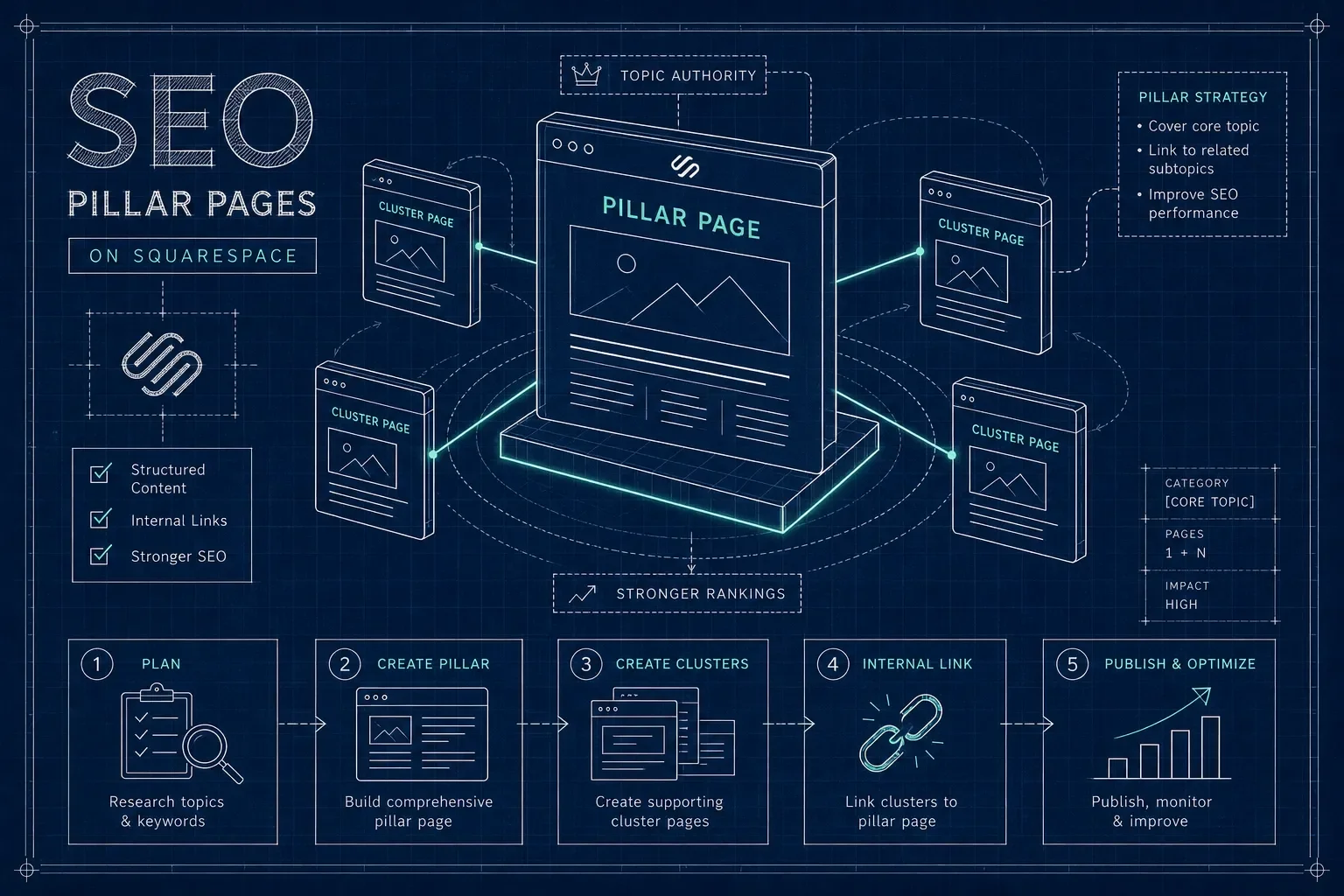
AI generated infographicAI-generated
Key takeaways
Pillar plus cluster: A broad SEO pillar page linked to focused supporting posts is the foundation of topical authority in modern SEO.
Squarespace pages, not posts: Build your pillar on a standard Squarespace page so you have full Fluid Engine layout control.
Two-way linking is a best practice: The pillar links to each cluster post, and each cluster post links back. Bidirectional links make the relationship explicit to both users and crawlers; one direction alone is rarely enough.
Depth matters: Aim for 3,500 to 4,500 words on your pillar page. A 700-word overview is typically insufficient to compete for broad, competitive queries.
Results take time: For most sites, expect three to six months before meaningful organic traction appears. Ninety days is the first useful checkpoint, especially for established domains with some existing authority.
Site structure first: A well-written SEO pillar page on a structurally broken site WILL NOT produce the results you’re expecting.
So, what is an SEO pillar page, exactly?
A pillar page covers a broad subject comprehensively at a high level, then links out to dedicated cluster posts that each go deeper on one specific subtopic. It's the structural and strategic hub of a content cluster.
Think of it as the definitive overview that proves your site understands a topic, with each linked post proving you understand every dimension of it. That combination is what makes a true SEO pillar page a strategic asset, not just a navigation page.
The terms “Pillar Page,” “Cornerstone Content,” and “Topic Hub” often get used interchangeably, but they aren’t quite the same thing.
Here's the practical breakdown:
| Term | What it describes | Primary function |
|---|---|---|
| Pillar page | Structure and strategic role | Broad coverage + links to cluster posts |
| Cornerstone content | Quality and importance | Authoritative, foundational content on the site |
| Topic hub | Organizational function | Routes visitors to related content; may lack depth |
The pillar-cluster model works because of how Google evaluates topical authority. A cluster of well-linked, thematically related pages signals expertise across an entire subject area, not just on one isolated page. Building that network is what separates sites that rank consistently from those that publish continuously but gain no traction.
How do you choose the right pillar topic?
The right pillar topic sits at the intersection of what your business offers and what your audience searches for.
It needs to be broad enough to support five to ten cluster posts, but specific enough to be directly relevant to what you do.
A useful rule of thumb: if you already have five or more blog posts on one subject, that's a strong signal that a pillar page belongs there.
You may already have most of your cluster content written. The pillar is simply the missing hub that ties it together and gives Google a central authority page to anchor those posts around.
Before you commit to a topic, validate it with keyword research. Check that the broad topic has meaningful search volume using Google Search Console, Ahrefs, or even Google Autocomplete.
You're looking for a keyword phrase that is informational in intent and broad enough to umbrella multiple subtopics.
A pillar topic with no search demand won't drive organic traffic, no matter how well you write the page.
Your existing top-performing blog posts often reveal which pillar topics Google already associates with your site, making them the best place to start.
How to structure your SEO pillar page on Squarespace
Build your pillar on a standard Squarespace page, not a blog post.
A standard page gives you full layout control with Fluid Engine and isn't tied to a date stamp the way blog posts are.
URL and slug best practices
Use a descriptive, keyword-rich URL slug that reflects the broad topic directly.
Keep slugs short, lowercase, and hyphen-separated. Avoid dates or dynamic parameters in pillar page URLs, since the page is meant to be evergreen.
Your cluster content, on the other hand, works well as blog posts because they carry category tags that help group and organize your cluster over time.
Page hierarchy and Fluid Engine layout tips
The page structure itself should follow a clear hierarchy. Start with one H1 that names the topic directly.
Follow it with a linked table of contents using anchor links, which Squarespace 7.1 supports natively through the section anchor feature in the Design tab.
Anchor links dramatically improve navigation on long pages and give Google a clearer map of your content structure.
Use H2 headings for each major subtopic and H3s for supporting details within each section.
In Fluid Engine, build each major section as its own row. Use a two-column layout for sections that pair explanatory text with a supporting visual, table, or checklist.
This keeps the page scannable while preserving depth. Avoid burying important content in accordion blocks, since collapsed content may receive less crawl weight than fully visible text.
Length is not optional on a pillar page.
Aim for 3,500 to 4,500 words depending on topic breadth. Studies examining high-performing pillar pages consistently find averages above 4,000 words, which reflects the comprehensive coverage those pages need to earn authority.
A 700-word overview is typically insufficient to compete for a broad keyword in a real niche. Break the content into scannable blocks with short paragraphs, descriptive subheadings, occasional bullet lists, and a supporting visual or two to reduce cognitive load as readers move through the page.
Content pillar checklist before you publish
H1 targets your primary broad keyword
Table of contents with working anchor links
At least 3,500 words of substantive, original content
H2s for each major subtopic; H3s for sub-details
Keyword-rich, evergreen URL slug
Internal links to each cluster post placed contextually in body copy
Meta title and meta description completed in Squarespace SEO settings
At least one supporting visual per major section
Mobile preview checked in Squarespace before publishing
How does internal linking connect your pillar to cluster posts?
Internal linking between a pillar page and its cluster posts works in two directions, and both directions are strongly recommended.
From the pillar, link to each cluster post within the relevant section of the page using contextual prose, not a link dump at the bottom.
From each cluster post, link back to the pillar where the broader topic is first introduced. This bidirectional structure makes the relationship between pages explicit to both users and search engines, helping Google identify which page carries the most authority on the subject.
Anchor text quality matters here. The text you link should describe the destination specifically. "Squarespace mobile optimization checklist" works.
"Click here" does NOT.
Vary the phrasing slightly across different cluster posts rather than repeating the exact same keyword anchor on every page. Exact-match repetition adds little value and looks templated to both users and search engines.
In Squarespace, you add internal links directly in the text editor of any page or blog post. No plugin is required. Highlight the relevant text, click the link icon, and paste the URL of your pillar page or cluster post.
If your cluster posts currently have no link back to any pillar page, your internal linking strategy isn't fully working yet.
This is a common issue in site audits, and it's one of the easiest to fix once you know it's there.
How do you know if your pillar strategy is working?
The right metrics to track are organic clicks and impressions for the pillar URL, average position for the pillar's target keyword and its close variations, and the number of top-10 keyword rankings across the full cluster over time.
Google Search Console is free and gives you all of these insights.
Don't stop at traffic: track conversions, form submissions, or qualified leads tied to the pillar topic, because visibility without business outcomes is just a vanity metric.
Set your expectations correctly from the start.
Indexing and initial impressions can appear within days or weeks of publishing, but meaningful ranking movement typically takes 60 to 90 days.
Page-one visibility for competitive terms often requires four to nine months, and established topical authority across a full cluster commonly develops over six to twelve months.
The timeline depends on your domain's existing authority, how competitive your niche is, and how consistently you build and interlink cluster content.
Use 90 days as your first serious checkpoint: check whether the pillar is gaining impressions, whether cluster posts are entering the top 20, and whether clicks are trending upward.
If there's no movement by then, the issue is usually search-intent alignment, missing internal links, or content gaps, not a need to publish more pages.
Is your Squarespace site built to support pillar content?
Building an SEO pillar page on a site with structural problems won't produce the results you're expecting. Before you invest time writing 4,000 words of pillar content, it's worth checking whether your current Squarespace setup can actually support the strategy.
Several common site structure problems quietly block pillar success before it even starts.
Based on the audits Wallis Williams Design has conducted, the most frequent issues include:
No clear URL hierarchy (blog posts buried under /blog/ with no category structure)
Duplicate or competing pages targeting the same broad topic
Missing or broken internal links
Sites built entirely of blog posts with no dedicated pillar page at all
If you have three separate blog posts targeting the same broad keyword, they're competing against each other instead of reinforcing a single hub. That's the opposite of topical authority, and it's a structural fix, not a content fix.
Wallis Williams Design offers a flat-fee site audit covering site structure, internal linking, and SEO gaps. If you're not certain whether your current Squarespace setup is ready to support a content cluster, a diagnostic audit is the fastest way to find out before you do the work.
Start with one SEO pillar and build from there.
The framework is straightforward: one strong SEO pillar page, a cluster of focused blog posts, and bidirectional internal links.
Together, they build a content structure that signals topical authority over time. The hard part isn't writing the pillar. It's picking the right topic, getting the site structure right first, and keeping the linking consistent as you add new content.
Start with one pillar topic where you already have supporting content.
Get the structure right on that one cluster before expanding to a second.
A well-executed single cluster will teach you more about what works on your specific site than a loosely built three-cluster attempt ever will.
Work through the content pillar checklist above before you publish, make sure every cluster post links back to the pillar, and give the strategy a full 90-day window before drawing conclusions.